Posts

Toolkit 2: Maya - Pipeline 1 UV Layout - Body & Exporting Maps

Image
Here are all of the UV map layouts for the body of Jet Pack Jones. It was interesting to find out about putting multiple parts of the model on to one layout, this will come in handy for texturing skin such as the hands and face together. I will now move on to skinning the model. 

Toolkit 2: Maya - Pipeline 1 UV Layout - Head & Head Details

Image
I have now laid out the UV maps for the head model of Jet Pack Jones. The tutorial was fairly straightforward, I just need to practise organising the UVs on the grid. Now I will move on to mapping the UVs for the body. 

Toolkit 2: Maya - Pipeline 1 Body Modelling - Hands & The Final Model

Image
After a lot of time spent making changes and some patience, I have now completed the model for Jet Pack Jones. It was a fun and challenging process, and I am proud of what I have accomplished. I sometimes find technical things a little difficult to understand, so to have come this far is a big step for me. I will now move on to UV layouts.

Toolkit 2: Maya - Moom Goal Animation - Graph Editor Cleanup

Image
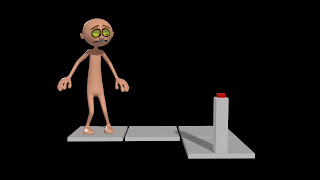
Here is the first test for the Moom goal animation. I cleaned up the graph editor whilst trying not to tamper completely with the animation, however I am slightly struggling with the right hand towards the end where Moom is pressing the button. It appears to float a little and wiggle, so I will need to revisit this and fix it.

Toolkit 2: Maya - Moom Goal Animation - Extra Poses

Image
For our Maya class, we continued with posing Moom for the goal animation. This time, we added in some extra poses to create a better flow for Moom's movement. I needed to remember to add more movement to Moom's hands, however I feel I could've done some more work with the face. I will continue to improve this next session.

Toolkit 2: Maya - Moom Goal Animation - Key Poses

Image
As we start to convert to online learning, our first lesson involved us to create key poses for our character, Moom. The aim is for him to reach his end goal, the button, but we had specific emotions that we needed to evoke within his face and body language, such as nervousness.

Premise: Storyboard First Draft

Image
For my Premise project, I decided to create an initial storyboard to help me visualise how the animation could potentially unfold. My main focus in this storyboard is to keep the camera close to the character’s faces to evoke a lot of emotion through their expressions and body language. The beginning of the storyboard shows the male character, RenĂ©, seeing flashbacks of himself and his love, Linette, spending time together, so I need to now consider how I will portray these memories through either editing or the actual animation. Another thing that I need to consider is how to texture the 3D model for Linette when she becomes a ghost. The idea is that she will be slightly transparent but not to the point where she will be hard to distinguish. I am now currently considering how I can push the characters designs even further and also incorporate the Art Nouveau style in to the final animation.